
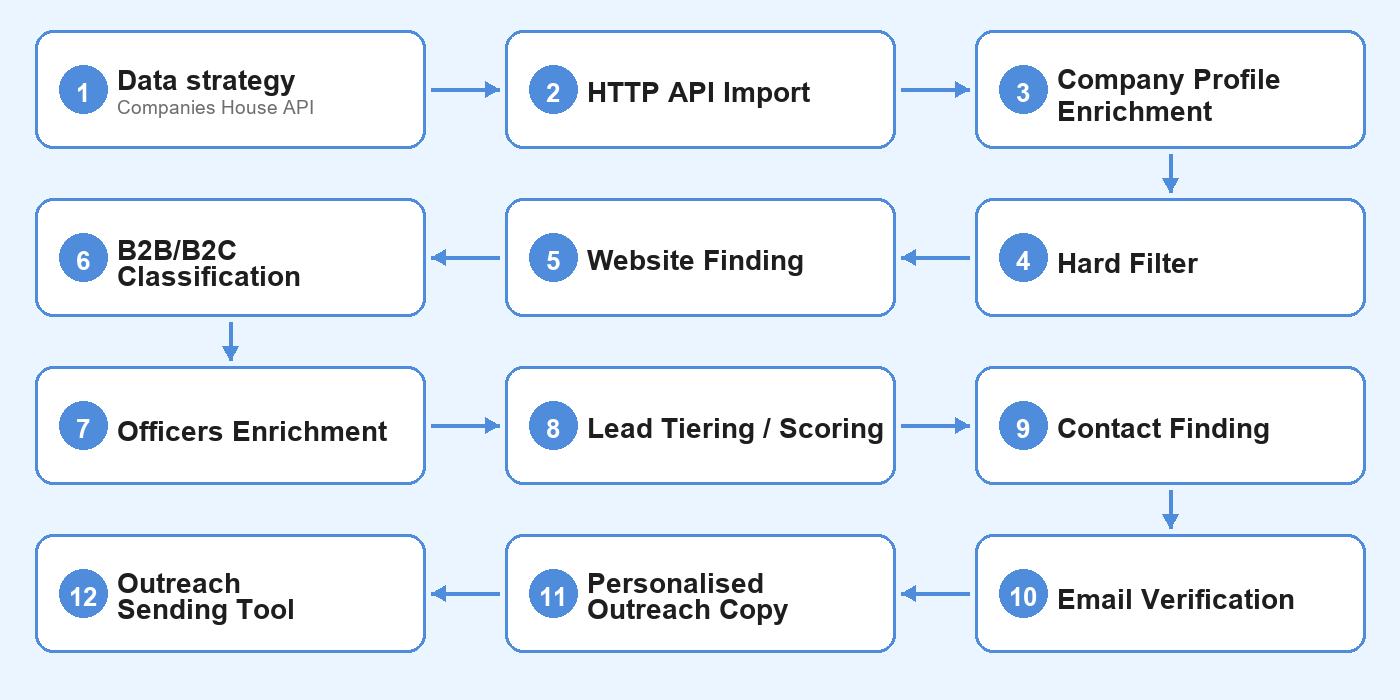
Step 1 - Data Strategy (Companies House API)
First, I needed to work out my data strategy. Thankfully, the Companies House API is excellent. It’s the UK’s public company registry - every limited company files here: incorporation date, director details, accounts type, charges, insolvency history. All publicly accessible via API, and all free.
I used 3 endpoints.
1 - Advanced Search
Returns a filtered list of companies by SIC code, status, and structure. This is the starting point to populate my dataset with a list of “active” UK plumbing companies from which everything else flows.
Documentation:
2 - Company Profile
Returns the full record for a single company - insolvency history, charges, accounts type, incorporation date, and status detail. I use this to pull disqualification signals before spending any credits on enrichment. If a company has insolvency history, active charges, or files dormant accounts, I want to know immediately.
Documentation:
3 - Officers
Returns every officer on record - name, role, appointment date, and year of birth. The director is the person I need to reach. The officer record gives me their name (required for email finding), how long they’ve run the business, and an estimated age - my single most important acquisition signal. A 62-year-old sole director running a debt-free plumbing company for 20 years is exactly who I’m looking for.
Documentation:

Step 2 - HTTP API Import
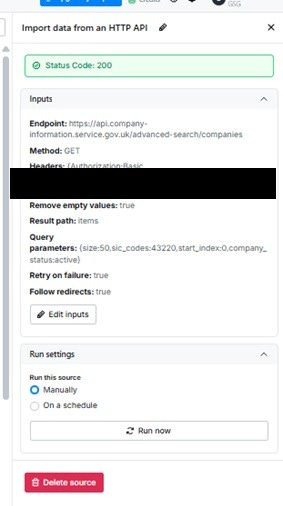
In Clay, I used “Import data from HTTP API” as the table source.
SIC code filtering
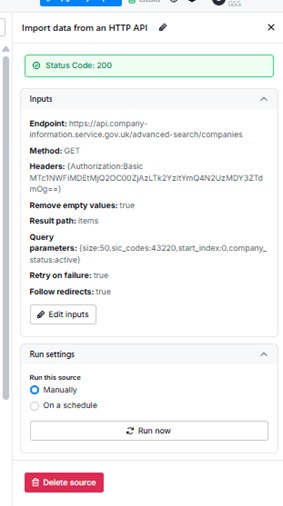
Companies House classifies every business by SIC code. Plumbing falls under 43220 (Plumbing, heat and air-conditioning installation). Passing sic_codes=43220 as a query parameter returns only plumbing companies. Full parameters: sic_codes=43220, company_status=active, size=50, start_index=0.
Authentication
The authentication method is HTTP Basic Auth. Clay requires credentials in Base64 format. I generated mine by running btoa(’API_KEY:’) in the browser console and pasting the result into Clay’s Authorization header as Basic [base64_value]. The same header works across every Companies House endpoint.
Pagination is handled via start_index - increment by 50 to pull beyond the first page. On the free tier the import caps at 50 rows; on a paid tier, one could loops through all pages to pull the full 52,000. No Clay credits are consumed on import.
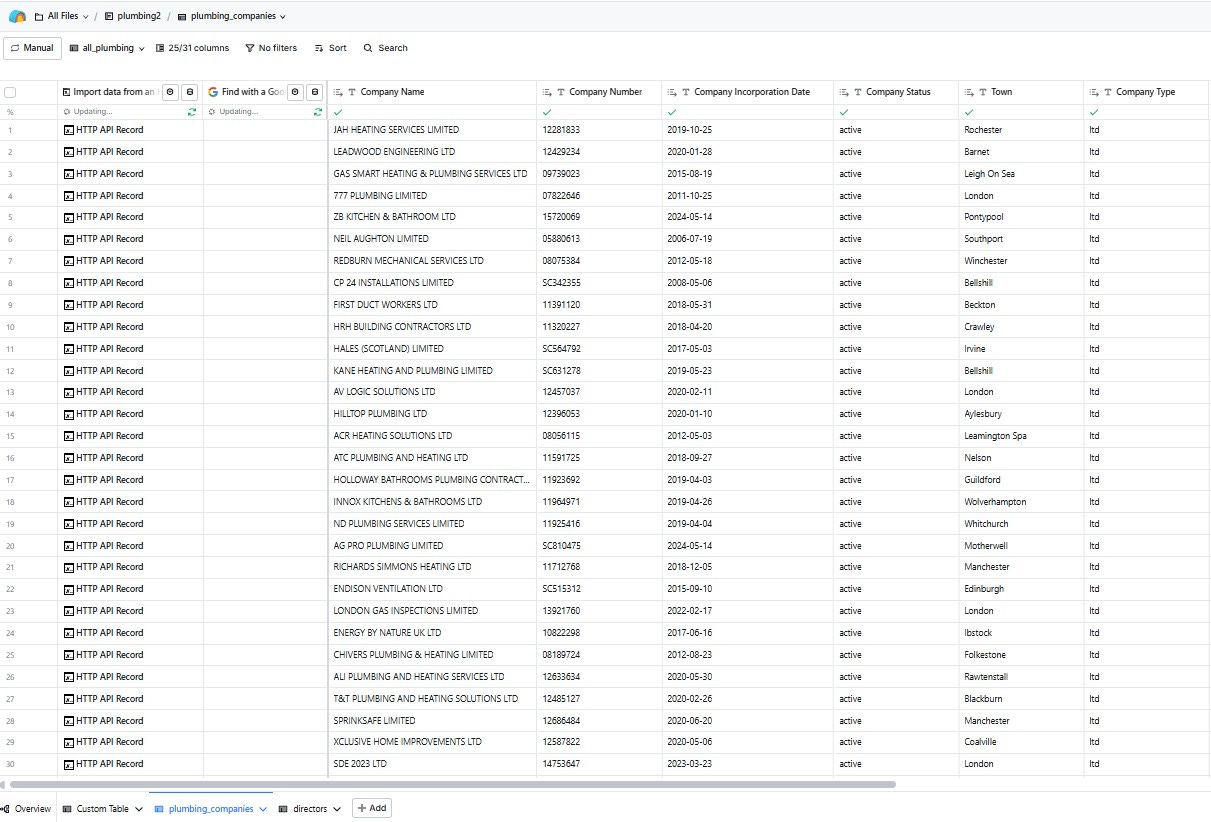
Fields pulled from the Advanced Search endpoint:
company_namecompany_number- the primary key for all subsequent enrichment callscompany_status- filtered to active onlydate_of_creation- used to identify companies incorporated before 2010company_type- confirms limited company structureregistered_office_address.locality- town
The resulting data that was pulled:
Step 3 - Company Profile Enrichment
For each imported company, I run a second Companies House call - this time against the company profile endpoint. Still free. Same API key, no third-party credits.
The three fields I pulled in:
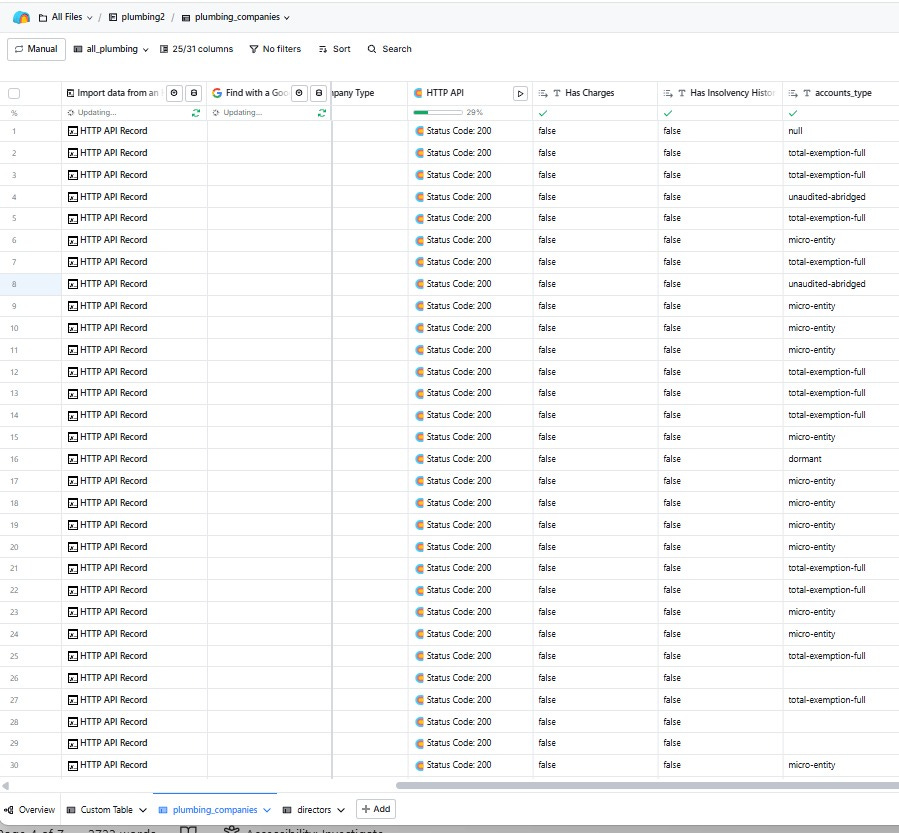
has_charges- flags outstanding debt against the businesshas_insolvency_history- immediate disqualifier if trueaccounts.last_accounts.type- the key size proxy.total-exemption-fullis the sweet spot;micro-entityis too small;dormantis an immediate disqualifier
Running this before any paid enrichment means I’m not spending credits on companies I’m about to eliminate. Every subsequent step - Claygent, email finding, domain enrichment - only fires on rows that pass these checks first.
The raw API response:
The resulting data:
Step 4 - Hard Filter
Before spending a single credit, I eliminate bad rows using deterministic formula checks. Based on what I actually pulled from the API, the filters were:
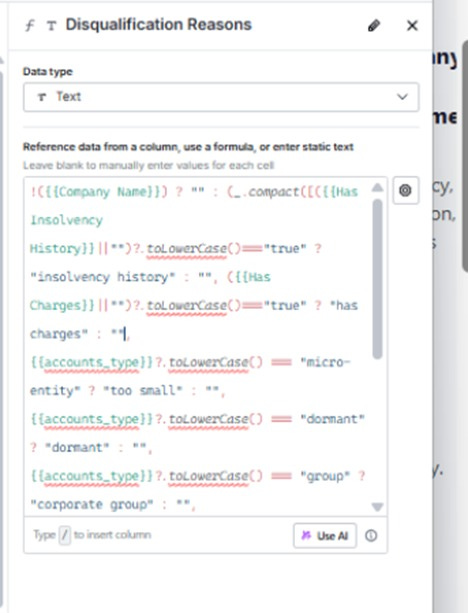
has_insolvency_history= true → DISQUALIFIEDhas_charges= true → flaggedaccounts_type is micro-entity, dormant, or group→ DISQUALIFIEDdate_of_creation after 2010→ TOO YOUNG
Formula columns in Clay are free and instant. In my 50-row dataset, the majority were knocked out here - mostly on accounts type, with micro-entity being the most common reason. This step typically eliminates 30–50% of rows before any paid enrichment runs.
I built two output columns to make the results readable:
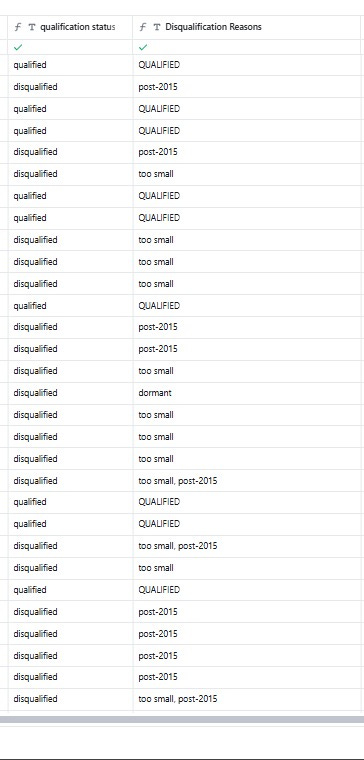
qualification_status- outputs “qualified” or “disqualified” as a clean labelDisqualification Reasons- outputs a human-readable reason for each eliminated row (too small, post-2015, dormant, etc.)
Both are free, auditable, and explainable - which matters when you’re trying to understand why a company was skipped.
The disqualification formula:
The resulting data:
Step 5 - Website Finding
Before running any contact enrichment, I need each company’s website domain. The reason is practical: email finding tools work significantly better when you give them a domain to search against. Asking “find me an email for John Smith at chiversplumbing.co.uk” returns far higher match rates than asking for “John Smith at Chivers Plumbing” - the domain acts as a lookup key.
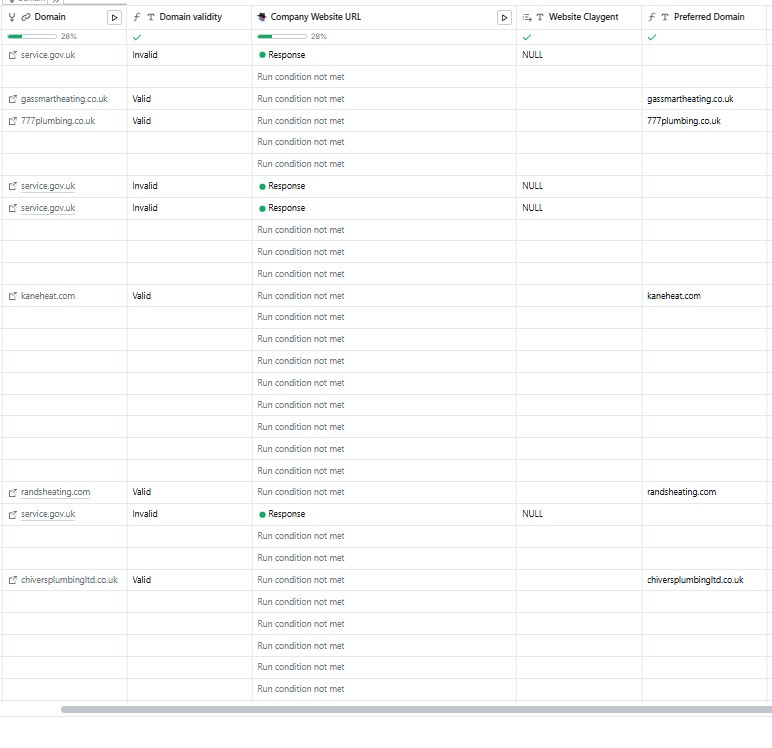
Finding websites for UK plumbing SMEs is harder than it sounds. Standard enrichment providers often return the Companies House government page, rather than the actual company website. To get around this, I built a three-layer approach:
Clay’s Company Domain enrichment - fast and cheap, works for well-indexed companies
Domain validity check - a formula column that flags service.gov.uk, Yell, Checkatrade, or other directories as “Invalid”
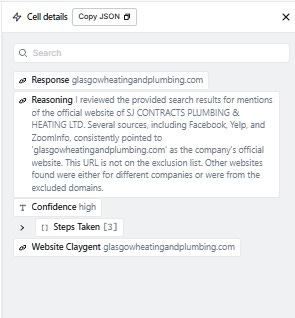
Claygent web research fallback - for Invalid or blank rows, Claygent searches Google with an explicit exclusion list for directories
The Claygent prompt instructs it to visit the result and return NULL if no direct company website exists - rather than a false positive. A Preferred Domain formula column then merges the best result from both sources into a single clean field, which gets passed into the email finding waterfall in the next step.
Claygent response:
Domain name results:
Step 6 - B2B/B2C Classification
Once I have a verified domain, Claygent visits each company website in web browsing mode and classifies the business as B2B, B2C, or Hybrid. This only runs on rows where Preferred Domain is not blank.
The classification matters for acquisition. B2B and Hybrid businesses can have more predictable revenue and longer-term contracts, where consumer-focused businesses may live on word of mouth - much harder to scale or hold together through an ownership transition.
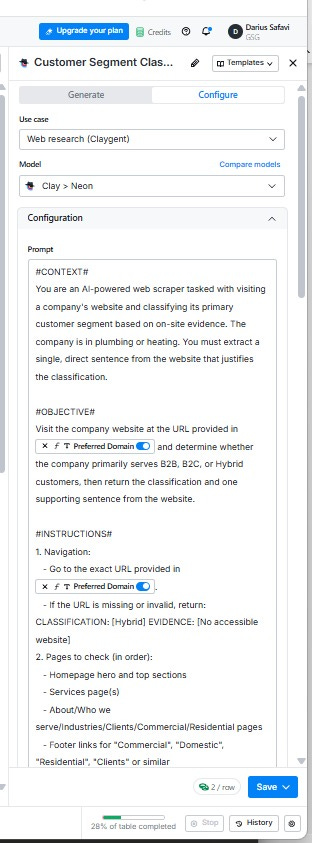
The Claygent prompt, containing: Context, Objective, Instructions, Examples.
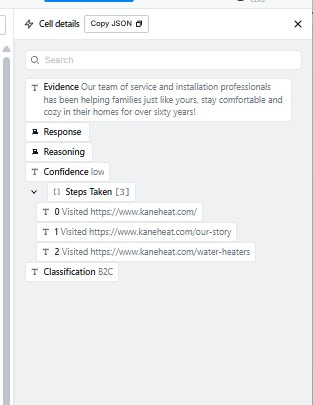
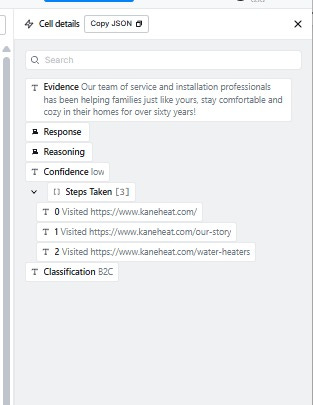
Claygent response:
Step 7 - Officers Enrichment
For qualified companies only, I pull director data from the Officers endpoint. The data pulled so far in the process tells me whether a business is worth buying. Officer data tells me whether the owner is likely to sell.
The profile I’m looking for: a single long-serving director who founded the business, is approaching retirement age, and has no obvious succession plan. A 62-year-old sole director who incorporated the company in 1998 and has been running it ever since. They built something valuable, they have no one to hand it to, and they haven’t seriously thought about an exit. That’s the opportunity.
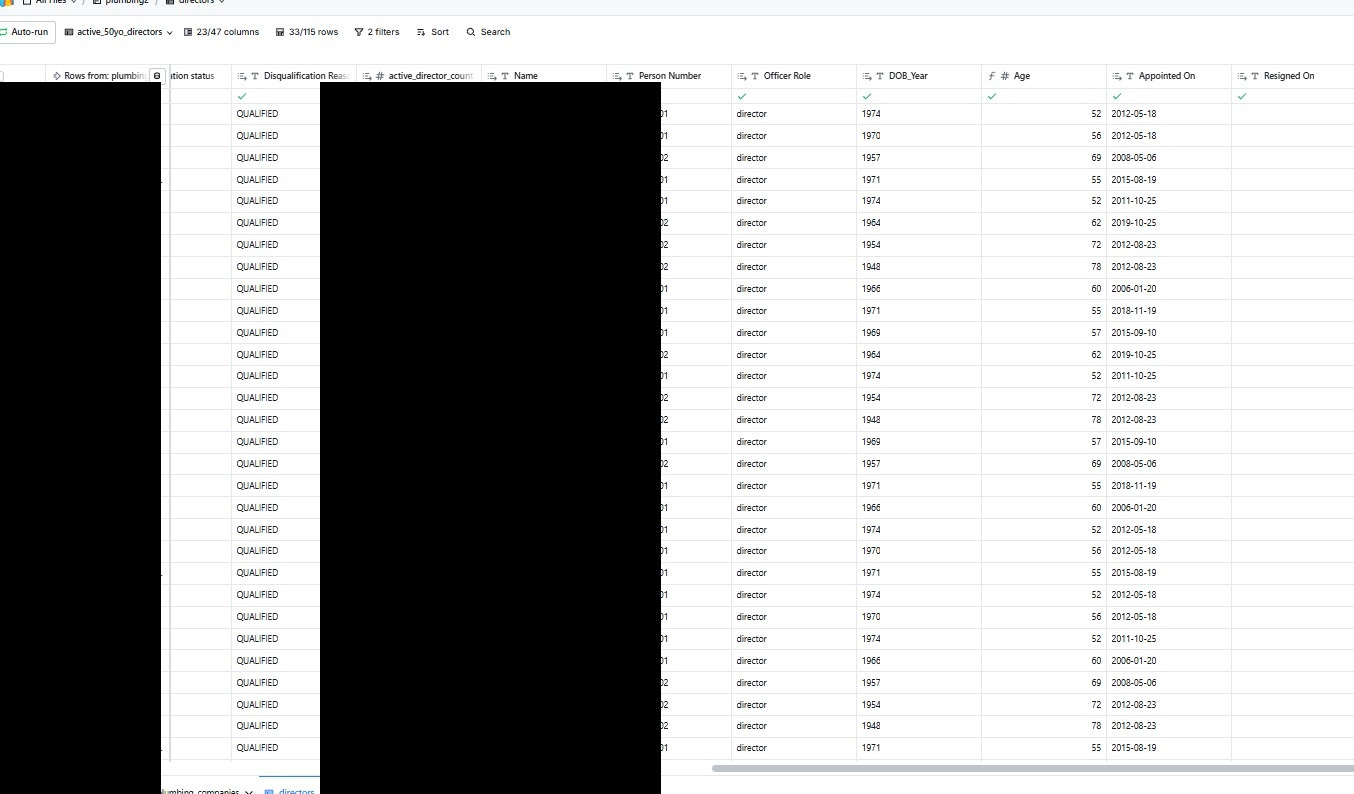
The fields I pulled:
Name - the director’s full name
Officer Role - confirms director rather than secretary or other officer type
Appointed On - how long they’ve been running the business
DOB_Year - used to calculate estimated age
Age - derived from DOB_Year; the primary acquisition signal
Person Number - unique identifier for each officer
The raw API response:
The resulting data:
Step 8 - Lead Tiering / Scoring
A formula column combines B2B/B2C classification and director age into a simple tiering:
HIGH: B2B or Hybrid + director aged 60+
MEDIUM: B2B or Hybrid, director aged 50–59
LOW: B2C, regardless of age
The logic is simple. The temptation is to build a weighted scoring model - points for accounts type, company age, director tenure. In practice, the two signals that matter most for acquisition fit are “company type” and “director age”. Everything else is noise.
Keeping it deterministic also means it’s fully auditable. For any row I can explain exactly why it scored HIGH - no black box or model drift. That matters when outreach decisions flow directly from the output.
HIGH tier contacts go into a priority sequence. MEDIUM tier go into a standard sequence. LOW tier will receive nothing - no copy generated, no credits spent, no sequencer push.
Step 9 - Contact Finding
This is the first step that real money. Everything up to this point - API calls, formula columns, Claygent classification - has been free or low cost. Contact finding is where third-party credits are consumed at scale, which is exactly why it sits here rather than earlier in the pipeline.
Run condition: only fires on directors linked to HIGH or MEDIUM tier companies. LOW tier directors are never enriched.
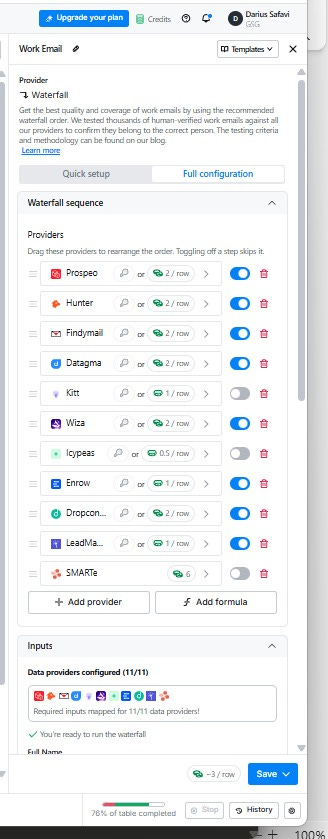
On the directors table, I run a work email waterfall. Clay tries each provider in sequence and stops on the first hit. No single provider has complete coverage of the UK SME market - chaining multiple sources increases the overall hit rate while only charging for providers actually queried.
The domain from Step 6 is the key input. Passing the director’s name alongside the company domain gives each provider a much tighter lookup target than the name alone - this is why website finding had to run first.
For directors with no work email found, personal email enrichment runs as a fallback. Many 60-year-old plumbing company owners use a Gmail address for business rather than a domain email - particularly those filing total-exemption-small accounts. Ignoring personal emails in this market means missing a meaningful proportion of the target list.
Step 10 - Email Verification
MillionVerifier runs only on rows where an email was actually found - no email, no verification credit spent.
The reason this step exists is deliverability. Sending cold email to unverified addresses damages sender reputation - bounces above a certain threshold trigger spam filters, which kills deliverability for every email sent from that domain.
MillionVerifier checks whether the address is real, active, and likely to accept mail.
This is the final gate before outreach. Everything downstream - copy generation, sequence push - only runs on contacts that have cleared every previous filter: qualified company, passing tier, found email, verified address.
Step 11 - Personalised Outreach Copy
[coming soon]
Step 12 - Outreach Sending Tool
[coming soon]